Review: Dell 2209WA 22" E-IPS LCD
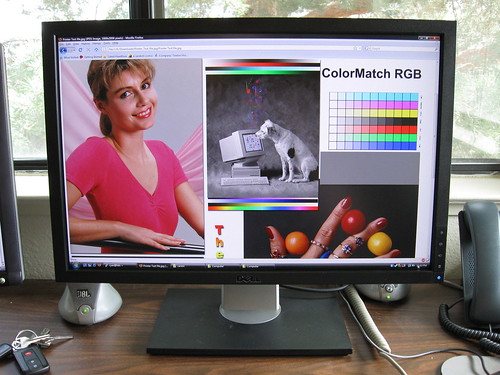
If you’re a frequent reader of my blog, you know that the Dell 2005FPW 20” LCD was the best LCD made. Ever. It was an S-IPS display, and used the same LCD panel as the $1400 20” Apple Cinema Display (2004 model), but at better than half the price of the Apple, and with more peripheral features. For 4 years, I’ve had the 2005FPW as my primary desktop monitor, and I’ve been struggling to get something to complement it ever since. I bought a cheaper Dell SP2008WFP (TN panel), but ended up returning it within a week Last December I bought an HP w2408h 24” that, while still a TN panel, was supposedly one of the best TN LCDs on the market. I made do with it.
Earlier this year, Dell released the 2209WA, first in Australia/New Zealand, then later in the US. The 2209WA is a 22” widescreen matte LCD, E-IPS 8bpp panel, 1680x1050 maximum resolution, 300 cd/m2 brightness, 1000:1 (up to 3000:1) dynamic contrast ratio, 6ms grey-to-grey response, and a 178° horizontal/vertical viewing angle. It currently retails for $279; I picked it up for $207 during one of their sales.
(If you are NOT a frequent reader of my blog, let me remind you that I am NOT a graphics professional. I am a Linux geek and amateur monitor snob, who happens to work at a marketing and design company. Graphics geek by proximity, you could say.)
What is IPS?
First off the bat, I’ll explain a bit about what an IPS panel is. 99% of the LCDs sold today come with TN panels. TN panels are fast, usually have better contrast controls, and are above all, cheap. However, they suffer from bad viewing angles (the point at which the picture washes out or inverts) and low NTSC color gamut. And often, cheap TN displays are manufactured in cheap ways unrelated to the panel technology; a common occurrence is uneven backlighting. (Display a black image and look around your LCD. You can often see where the CCFL tubes are, and where they radiate light unevenly.) Many TN displays are also badly color balanced out of the box, usually preferring blue. (This is particularly bad in the LCD TV market, known as “showroom syndrome”, where excess blue makes images look more “vibrant” in a television showroom.)
IPS displays have better viewing angles (often 179° horizontal, and 170° to 179° vertical) and high gamut, but at the expense of a higher response rate, and of course, higher prices. S-IPS was the standard for high-end displays, but the 2209WA is an E-IPS display. E-IPS includes the same features as S-IPS, but a slightly lower viewing angle (178° versus 179°) and a lower gamut than S-IPS (but still much higher than TN).
Physical Characteristics
The 2209WA features a square design with sharp lines. The base includes tilt, swivel and raise ability, and includes a hole in the back to route cables through. All three adjustment methods are relatively easy to do by hand, and stay in place well. The viewing area is matte, as is the outside of the bezel. However, the inside of the bezel (closest to the panel) is glossy for some reason, and as a result, it tends to reflect bright objects on the display that are close to the display edges. It’s minor, but can be distracting.
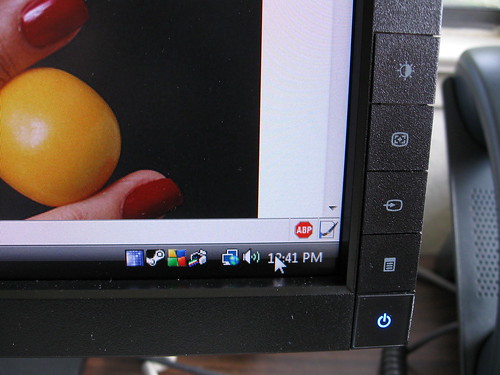
The menu/adjustment buttons are square, the width of the bezel, from the bottom-right corner of the bezel. While this breaks the flow of the otherwise continuous bezel, it is useful, as the on-screen display’s control legend lines up with these buttons. A chrome mirror Dell logo is at the bottom center of the bezel.
The 2209WA accepts d-sub VGA or DVI inputs, and can be configured to auto-sense signal from either port. It has a USB B (uplink) port to your PC, two USB ports on the underside, and two more on the left side of the monitor.
Calibration
I borrowed a Spyder2PRO from work and calibrated the 2209WA. Out of the box, the 2209WA was set to 6500K, though it doesn’t actually list the color temperature, just modes like “cinema” and “gaming” that adjust the individual RGB ranges, and also fiddles with the brightness and contrast. Since I had the Spyder, I opted to start with the factory default settings, and adjust RGB by hand.
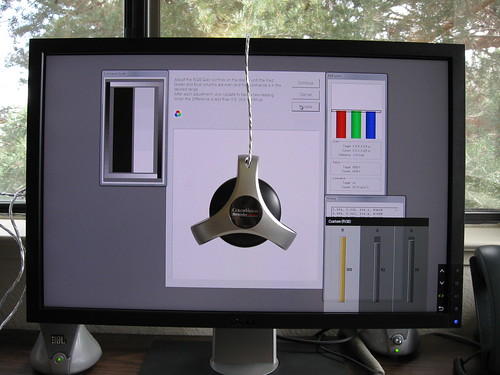
The 2209WA was fairly well balanced out of the box. It was a bit heavy on the green, but was easily adjusted. My final numbers at home were 100 red, 92 green, 96 blue, to get an even balance, and the final color temperature measured 6506K.
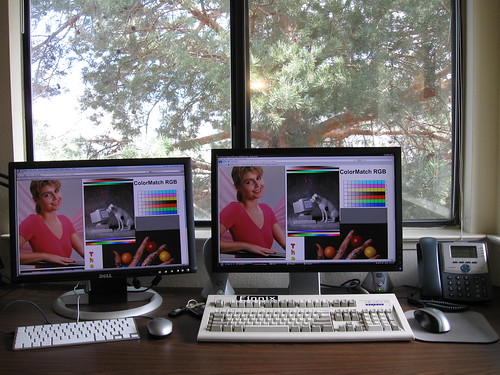
On the left is my 2005FPW, on the right is the 2209WA. Color representation is pretty well matched, but notice that luminance matching was NOT performed, and using default brightness settings, the 2209WA is noticeably brighter than the 2005FPW, though not overpoweringly so.
The backlight is excellent. Out of the box, I saw some barely visible vertical discolorations about 1/3 and 2/3 of the way down the display when on a black background, but after I calibrated the monitor, I couldn’t find them again. There is virtually no light bleed from the sides, tearing is non-existent during full motion video, and ghosting is barely perceivable.
Miscellany
One of the biggest feature omissions is the lack of 1:1 pixel support. This personally is not an issue to me, but could be a deal breaker for some.
The behavior of the built-in USB hub is also a problem. With the 2005FPW, the USB ports were always powered, even if the monitor was off. Every Dell monitor I’ve seen since then (SP2008WFP, and now 2209WA) has switched to a model where if you power off the monitor, the USB ports are also powered off.
Impressions
The bezel looks a bit clunky; I still prefer the rounded bezel design of the 2005FPW. The lack of 1:1 pixel mapping and the USB issues are annoying, but not deal breakers. Also keep in mind that there is no composite/s-video/hdmi ports, nor any audio support. This is a monitor for graphics work, and is quite well suited for that task.
It’s no 2005FPW, but hey, what is? But this is, hands down, the best value in IPS displays you can get right now, so I definitely recommend it.